
Every business
Automate the routine work in your business and keep only the decisions
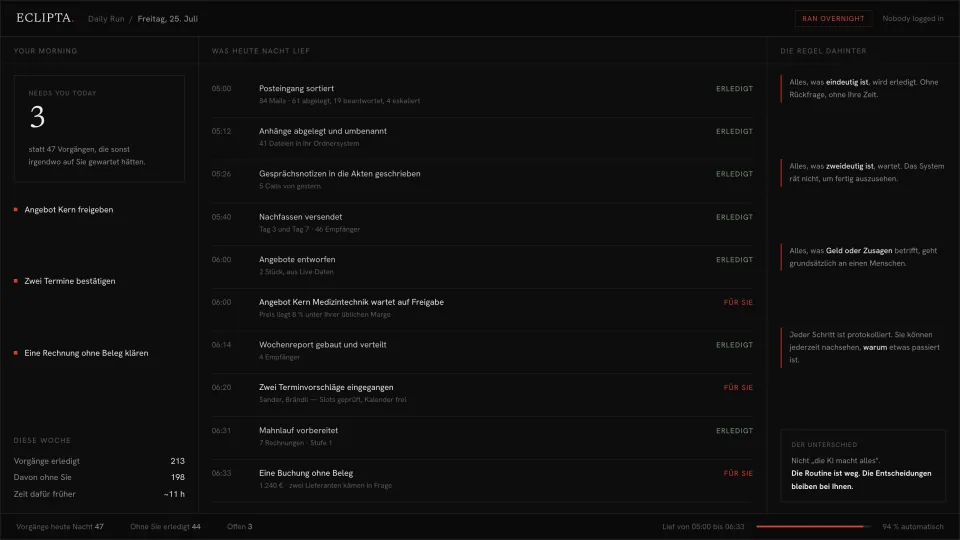
Inbox sorting, meeting notes, follow-ups, filing and reporting run on a schedule, overnight, without anyone logging in. In the morning you get the short list of things that genuinely need a person. The routine is gone. The decisions stay with you.
Why routine work never gets smaller
Nobody plans a day around routine work. It arrives in pieces. Sixty mails that mostly need sorting rather than answering. Five calls whose notes should end up in the right file. A follow-up that was due on day three and another on day seven. Attachments to rename. A weekly report to assemble from four places. Each item is small enough that stopping to automate it feels like the wrong use of an afternoon.
The cost never shows up as a line item. It shows up as evenings. It shows up as the follow-up that went out on day eleven, when the buyer had already decided. It shows up as the report that arrives on Thursday because Wednesday was busy, and as the quiet knowledge that the person who does all of this is not replaceable, because none of it is written down.
The reflex is to hire. That works, and it also means the routine now has a salary attached and a training period, and it comes back the moment that person is on holiday. The other reflex is to buy a tool per problem, which produces eleven tools that each solve one tenth of a Tuesday and none of which talk to each other. Neither reflex touches the actual structure of the problem: most of these tasks follow rules that already exist, and a small number of them do not.
- The same twenty minutes of sorting happens every morning before real work starts.
- Follow-ups go out when someone remembers, not on the day they were due.
- Notes from calls live in a notebook and never reach the customer file.
- The weekly report is assembled by hand from four systems, every week.
- One person holds the whole routine in their head and takes it with them on holiday.
- Work that could have been done at five in the morning waits for a human to log in.
How an automated daily run works in practice
The built system runs your recurring work on a schedule instead of on your attention. It works through the tasks overnight, does everything that is unambiguous, and leaves a short list of what needs a decision. You do not operate it. You read the result.
- 01
The routine gets written down before anything runs
Every recurring task is captured as it actually happens today: what triggers it, what it touches, what the rule is, and where the rule breaks. This step is unglamorous and it is where the value comes from. A task nobody can describe cannot be automated, and describing it usually reveals that two people have been doing it differently.
- 02
It connects to the systems you already run
Mail, calendar, drive, accounting, whatever holds your customer records. No migration, no new place for the team to check. The system works inside your existing tools, because a routine that lives in a separate app is a new routine, not a removed one.
- 03
It runs on a schedule, not on demand
A daily run starts in the early hours. Inbox sorted and filed, attachments renamed into the right folders, call notes written into the customer files, follow-ups sent on their due day, the standard offers drafted from live data, the weekly report built and distributed. All of it before anybody opens a laptop.
- 04
Anything unambiguous is simply done
A mail that clearly belongs in a project folder is filed. A follow-up whose sequence and recipient are defined is sent. A note whose customer is identified is written. There is no approval queue for work that has one correct answer, because an approval queue for obvious things is just the old routine with an extra click.
- 05
Anything ambiguous stops and waits
An offer priced below your usual margin, a booking with no receipt where two suppliers would fit, a mail that could be a complaint or a negotiation. The system does not resolve these by picking the more likely option. It holds them, states what it found and what it could not decide, and moves on to the next task.
- 06
Your morning is the exception list
Instead of the full volume of the night, you see the items that need you, with the reasoning already done. A handful of decisions replaces a morning of processing. Every step, including the automatic ones, is logged, so you can always ask why something happened.
Take this with you
A free routine inventory: find out what is actually worth automating
Before anyone should build anything, you need to know where your hours go. This is a one week logging format plus a prompt that reads the filled in log and sorts every task into three buckets: runs on clear rules and can be automated, needs machine preparation but a human decision, belongs entirely to a person. It sorts by hours saved per month and states, for each task, what would make the automation fail. The hours come from your own measurement, not from an estimate we made up.
PART 1: LOG FOR ONE WEEK

Keep one line per recurring task, every time you do it. Five seconds
each. Do not tidy it up and do not skip the small ones, because the
small ones repeated forty times are where the hours are.

Columns:
  TASK        | what you did, in your own words
  TRIGGER     | what started it: a mail, a date, a person asking, habit
  MINUTES     | roughly, honestly
  TIMES/WEEK  | how often this happened
  DECISION?   | yes if judgement was needed, no if you followed a rule
  IF YES, WHY | the one thing that made it a judgement call

Example lines:
  Sort inbox | new mail | 20 | 5 | no |
  Approve discount on offer | sales asked | 10 | 3 | yes | below margin
  Write call notes into file | after call | 8 | 12 | no |

PART 2: PASTE THE LOG INTO THIS PROMPT

You are an operations analyst. Below is one week of logged tasks from
a business. Analyse it and produce a routine inventory.

STEP 1: SORT EVERY TASK INTO EXACTLY ONE BUCKET
  A. RULE BASED. Follows a rule that could be written down completely.
     A machine could do it end to end without asking anyone.
  B. PREPARED BY MACHINE, DECIDED BY A PERSON. Gathering, drafting and
     checking can be done automatically, but the final call needs
     judgement, authority or accountability.
  C. HUMAN ONLY. The work itself is the judgement. Automating the
     preparation would save little or nothing.
For each task state the bucket and one sentence of reasoning.

STEP 2: QUANTIFY, USING ONLY MY NUMBERS
Compute monthly hours as minutes x times per week x 4.33 / 60. Use
only the figures I logged. Never estimate a task I did not log and
never inflate a number to make a case. If a line is unusable, say so.

STEP 3: RANK
List bucket A first, then bucket B, each sorted by monthly hours,
largest first. Show: task, bucket, hours per month, trigger.

STEP 4: STATE THE FAILURE MODE FOR EACH ONE
This is the important section. For every task in A and B, name the
specific thing that would make automation go wrong: an input that is
inconsistent, a rule with an undocumented exception, a system with no
usable access, a case where being wrong is expensive. One sentence.
If a task in bucket A has a failure mode that cannot be detected
automatically, move it to bucket B and say why.

STEP 5: THE HONEST SUMMARY
Give me: total logged hours per month, hours in each bucket, and the
three tasks I should look at first with the reason. Then tell me
which of my log lines are too vague to judge and what I would have to
write down to make them judgeable.

ABSOLUTE RULE
Work only from what I logged. Do not invent tasks, do not assume
industry averages, do not promise a saving. You are sorting and
counting my own measurements, nothing else.

MY LOG:
[PASTE YOUR WEEK OF LINES HERE]- Keep the log for five working days. A partial week is fine, an imagined week is not, because the whole point is that the numbers are yours.
- Include the tasks that feel too small to mention. Twenty minutes a day is more than an hour a week.
- Paste the log into the prompt and read step 4 before step 3. The failure modes are what separate a real candidate from a plausible one.
- Take the top item in bucket A and write its rule out in full, including the exceptions. If you cannot, it belongs in bucket B.
- Repeat the log in three months against the same format to see whether the picture held.
The inventory tells you what is worth automating. It does not do a single one of the tasks. It never opens your inbox, never sends a follow-up on day three, never writes a note into a customer file and never notices that a task happened at all. It also only sees the week you logged, so a monthly close or a quarterly report will be missing unless you catch them. And it depends entirely on your honesty about the minutes: a log that flatters the current process produces an inventory that flatters the current process. That is the gap. The inventory is a map of the work. The built system is the thing that does it.
Where an inventory ends and an automated daily run begins
Knowing where your hours go is worth having on its own. Most people are surprised by the ranking, and the failure mode column usually kills two candidates that looked obvious. But the inventory changes nothing about tomorrow morning. The sixty mails still arrive, the follow-up is still due, the report still needs assembling.
The built system takes bucket A off the table entirely and does the preparation for bucket B. It runs while nobody is logged in, works through the recurring tasks in order, files what belongs filed, sends what is due, drafts what can be drafted from live data, and writes the report. The work is finished before the day starts.
The rule it runs on is worth stating plainly, because it is the reason the output can be trusted. Everything unambiguous is done without asking. Everything ambiguous waits for a person. Anything touching money or a commitment goes to a person by default, even when the answer looks obvious. The system never guesses in order to look finished, and every step it took is logged, so the question why did this happen always has an answer.
- Runs on a schedule overnight, so recurring work is done before anyone logs in.
- Works inside your existing mail, calendar, drive and records, with no migration.
- Files, renames, writes notes, sends follow-ups and builds reports without approval queues for the obvious.
- Stops on ambiguity and shows what it found and what it could not decide.
- Sends anything involving money or a commitment to a person by default.
- Logs every step, automatic ones included, so decisions can be audited later.
Frequently asked questions
Which routine tasks in a small business can actually be automated?
The ones that follow a rule you could write down completely, including the exceptions. Sorting and filing incoming mail, renaming and storing attachments, writing call notes into the right customer record, sending follow-ups on a defined schedule, assembling a recurring report from fixed sources. The test is not whether the task is boring. It is whether a competent new colleague could do it correctly from a written instruction, without asking anyone.
How do I find out what to automate first in my company?
Measure before you build. The free inventory on this page exists for exactly that: log every recurring task for one week with minutes and frequency, then let it sort and rank them. The ranking is usually not what people expect, because the biggest item is normally a small task repeated many times rather than the one annoying task everybody complains about.
Can I not just do this with ChatGPT?
For the thinking, yes, and the prompt on this page is written for it. What a chat window cannot do is start by itself at five in the morning, open your mailbox, file an attachment into your drive, send a follow-up on the correct day and write into your customer records. Every one of those steps needs a person to paste something in and paste something out, which is the work you were trying to remove in the first place.
What happens when the system is not sure what to do?
It stops and hands that one item to a person, with the context already assembled and the reason it could not decide stated plainly. An offer priced below your usual margin, a payment with no matching receipt, a mail that could be a complaint or a negotiation. It does not pick the more probable option to keep the queue empty, because a wrong action taken quietly is far more expensive than an item that waited until morning.
Where does our data go and who can see it?
The system runs against your own mail, your own storage and your own records, and we do not retain your business data. Customer correspondence, invoices and personnel matters are exactly the material that should not pass through a general purpose chat tool. For teams with strict requirements it can be set up so no content leaves systems you control.
What does it cost and how long does it take to set up?
It depends on how many routines you want covered and how consistent they already are. One clearly defined routine running end to end is a short project. A full daily run across mail, filing, notes, follow-ups and reporting is built in stages, usually starting with the single largest item from your own inventory so the first result arrives early. The undocumented parts of a routine are the honest driver of effort, not the number of tools involved.
Will this replace the person who currently does the routine work?
That is a decision for you, not a claim we make. What the system removes is the work that follows rules. What remains is judgement, relationships and the exceptions, which is normally the part that person was never getting to. Businesses that build this usually do it because they cannot hire fast enough, or because the routine currently depends on one individual and their holiday.
Bring us one week of your log
The clearest way to find out whether this fits is your own measurement. Fill in the inventory above and show us the result. We will tell you honestly which items a system could run on its own, which ones would always stop for a person, and what building it would involve. If the answer is that two habits and a calendar reminder would solve most of it, we will say that.
Apply