
Every business
Automatically file email attachments into the folders you already use
Incoming attachments get recognised, renamed and filed into your existing folder system. Nothing is migrated and no new tool replaces your drive. The cases that are genuinely unclear collect into one approval in the evening instead of interrupting somebody seven times a day.
Why filing never stays done
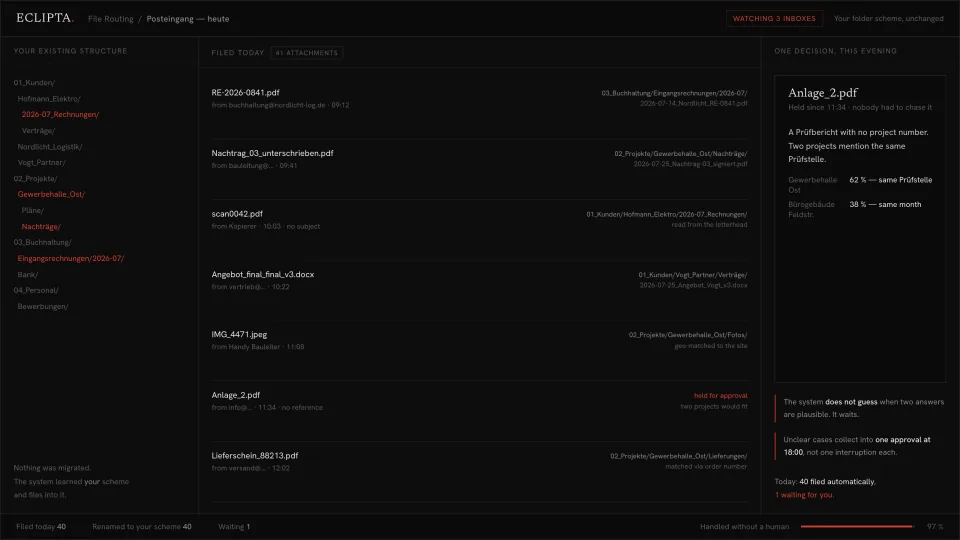
Filing is not difficult work. It is constant work. An invoice arrives from a supplier, a signed variation order comes back from the site manager, the copier emails a scan called scan0042.pdf with no subject line, a photo lands from a phone, a delivery note arrives with an order number and nothing else. Each one takes twenty seconds to place correctly. Forty of them take a morning that nobody planned for.
So it gets deferred. Attachments stay in the inbox, get pulled out during the next crisis, and half of them land in a downloads folder instead. Six weeks later someone needs the signed variation order and cannot find it, because it is sitting in a mail thread under the name Nachtrag_03_unterschrieben.pdf, which tells you nothing unless you already know the project.
The usual answer is a new document management system, which means migrating years of folders, retraining everyone, and discovering that people keep using the shared drive anyway. That is a large project to solve a small recurring task. The folder structure was never the problem. The problem is that filing into it is manual.
- The same document exists in three places and nobody knows which copy is current.
- Scans arrive named scan0042.pdf and get filed under whatever the scanner called them.
- Invoices sit in a mailbox until month end, then get processed in one painful block.
- Two people file the same project differently, so search only works if you guess right.
- Finding a document from last spring means searching mail, not searching the drive.
- Nobody wants to be the person who moved a file somebody else was looking for.
How automated document filing works in practice
The built system watches the places documents actually arrive, then files them where your team already looks. Your structure stays exactly as it is. Nothing is migrated, nothing is renamed retroactively, and no one has to learn a new interface.
- 01
It learns your existing structure first
Before it files anything, it reads how you already work: your folder tree, your naming pattern, which client sits under which top level folder, how you date things. The rules come from your drive, not from a template. If your scheme is 01_Kunden, 02_Projekte, 03_Buchhaltung, that is the scheme it files into.
- 02
It watches the inboxes where documents arrive
Shared mailboxes, the accounts department address, the scanner, the phone photos from site. Attachments get pulled out as they land, not once a week when somebody remembers.
- 03
It reads the document, not just the filename
A scan with no subject line and a meaningless filename still has a letterhead, an invoice number, a date and a client name inside it. A delivery note carries an order number that matches a project. A site photo carries location data. That content is what determines where it goes.
- 04
It renames to your convention and files it
The output is a file named the way your team names files, in the folder your team already uses. A supplier invoice becomes 2026-07-14_Nordlicht_RE-0841.pdf under Eingangsrechnungen for the right month. Nobody has to remember the format, because the format is applied every time.
- 05
It stops when two answers are plausible
An inspection report with no project number, where two live projects use the same inspection body, is not a filing decision a machine should make on a coin flip. It gets held. The system says which two folders would fit and why it cannot choose.
- 06
Held cases become one approval, not seven interruptions
Everything unclear collects into a single review at a fixed time. One person opens it, makes the calls in a couple of minutes, and the filing is done. A typical day is most documents filed on their own and a small number waiting.
Take this with you
A free prompt: turn your folder tree into a written filing rulebook
Most teams already have a filing logic. It lives in the heads of two people and has never been written down, which is why the third person files differently. This prompt reads it back out of your own drive. You paste in a folder listing and a sample of filenames, and it returns the rules you are actually following, written as instructions a new colleague could apply on day one. It also names every place where your structure contradicts itself, most common contradiction first.
You are a records manager. Your job is to read an existing filing
system and write down the rules it already follows, so that a new
colleague could file correctly on their first day.

I will paste a folder listing and a sample of real filenames below.
The structure grew over years and was never documented. It is
inconsistent in places. That inconsistency is what I need you to find.

STEP 1: INFER THE RULES
From the material alone, work out and state the conventions actually
in use. Cover at least:
  - Top level logic: what the first folder level sorts by
  - Date format and where the date sits in a filename
  - How a party is written: client, supplier, project, department
  - How document type is expressed: invoice, contract, report, photo
  - How versions and signed copies are marked
  - Separators, capitalisation, abbreviations, language
State each rule in one sentence, then give two real examples from my
material that follow it.

STEP 2: WRITE THE RULEBOOK
Produce a filing rulebook a person can follow without asking anyone:
  A. A naming pattern, written as a template with placeholders
  B. A decision list: given a new document, which questions to ask in
     which order to reach the correct folder
  C. Three worked examples, from raw incoming filename to final path

STEP 3: FIND THE CONTRADICTIONS
List every place where the material breaks its own rules. Sort by how
often each contradiction occurs, most frequent first. For each one:
  - What the inconsistency is
  - How many examples in my material show it
  - Which of the competing variants is more common
  - The one change that would remove it, and what it would cost to
    apply retroactively
Do not soften this section. Inconsistencies you skip are the ones
that will keep costing search time.

STEP 4: NAME THE AMBIGUOUS CASES
List the document types where your own rulebook would not give a
single clear answer, for example a document that belongs to both a
client and a project. Say what extra information a person would need
to decide. Do not invent a rule to cover these. Mark them as cases
that need a human decision.

ABSOLUTE RULE
Describe only what is present in my material. Never propose a tidier
scheme I did not ask for, and never assume a convention because it is
common practice elsewhere. If the material is too thin to infer a
rule, say so and name what listing would answer it.

MY FOLDER LISTING AND FILENAMES:
[PASTE A FOLDER TREE HERE. ON MAC: find . -maxdepth 3 -type d
ON WINDOWS: tree /F THEN PASTE 40 TO 60 REAL FILENAMES.]- Generate a folder listing three levels deep and copy in forty to sixty real filenames, including the ugly ones. Scans, phone photos and files called final_v3 are the useful material here.
- Paste the prompt, then the listing. Read step 3 before anything else, because the contradiction list is where the time goes.
- Fix the single most frequent contradiction first. One fix usually explains a large share of the failed searches.
- Save the rulebook from step 2 where new colleagues will find it, and use it when onboarding rather than explaining the drive verbally.
- Re-run it in six months against a fresh listing to see whether the rules held.
The rulebook is an instruction for people. It does not file anything. It never sees an incoming mail, never opens an attachment, never reads a letterhead to find out which client a scan belongs to, and never renames a single file. It cannot decide anything at the moment a document actually arrives, which is the moment that matters, and it has no answer when two projects would both fit. Everything it produces still depends on a person remembering to apply it on a busy Tuesday. That is the honest gap: the prompt describes the filing logic, the built system executes it.
Where a written rulebook ends and a filing system begins
A documented convention is genuinely worth having. It settles arguments and makes onboarding faster. What it does not change is the arrival of forty attachments tomorrow morning, each needing a small decision from a person who is doing something else.
The built system takes over the decision itself. It reads the content of the document, matches it against your clients, projects and order numbers, applies your naming pattern and puts the file where it belongs. Your structure stays exactly where it is, because migrating it was never necessary.
The part worth being explicit about is where it refuses. Whatever is unambiguous runs on its own. Whatever is ambiguous waits for a person. Anything touching money or a commitment goes to a person by default. A document that could belong to either of two projects does not get filed on the balance of probability, it gets held with both options and the reason stated. That refusal is what makes the other ninety-odd percent trustworthy.
- Files into your current folder tree with no migration and no new interface.
- Reads letterheads, invoice numbers, order numbers and photo location data, not just filenames.
- Renames every document to your own convention, applied identically every time.
- Watches shared mailboxes, the scanner and site photos as documents arrive.
- Holds genuinely ambiguous cases and shows both candidates with the reason.
- Collects held cases into one approval at a fixed time instead of constant interruptions.
Frequently asked questions
Can AI automatically file email attachments into the right folders?
Yes, for the clear majority of documents. A supplier invoice, a signed variation order or a delivery note carries enough inside it to identify the client, the project and the document type, even when the filename is meaningless. The part that needs care is the remainder. A well built system holds those instead of filing them somewhere plausible, because a wrongly filed document is worse than an unfiled one: nobody knows to go looking for it.
Do we have to migrate our folders or switch to a document management system?
No. The system learns your existing structure and files into it. Nothing moves, nothing gets renamed retroactively, and your team keeps opening the same drive in the same way. That is deliberate. Most filing projects fail at the migration step, because people quietly go back to the shared drive while the new system fills up with half the documents.
Can I not just do this with ChatGPT?
You can do the thinking part with it, which is exactly what the prompt on this page is for. What a chat window cannot do is watch a mailbox, open an attachment on its own, compare it against your live project list and write a renamed file into your drive. Every one of those steps still needs a person to copy something in and copy something out, which is the work you were trying to remove.
What happens when the system cannot tell which project a document belongs to?
It stops. The document is held, both candidate folders are shown, and the reason each one fits is stated, for example that two projects use the same inspection body. A person resolves it in seconds because the thinking has already been done. The one thing that never happens is a silent guess, because a silent guess is undetectable until somebody needs the file.
Where do our documents go, and who can see them?
The system runs against your own storage and your own mail accounts, and we do not retain your files. Invoices, contracts, personnel documents and client correspondence are precisely the material that should not be passed through a general purpose chat tool, which is one more reason the filing step belongs in your own infrastructure. For teams with strict requirements it can be set up so no document content leaves systems you control.
How much work is it to set up automatic document filing?
It depends mostly on how consistent your current structure is, which is why the free prompt above is a useful first step: the contradiction list it produces is a fair preview of the effort. A stable folder scheme and a handful of recurring document types can be running quickly. A structure where three people file three different ways needs those decisions made first, and that work has value whether or not anything gets automated.
Does it work for scanned paper and photos, not just email attachments?
Yes. A scan from the copier is often the hardest case for a human, because the filename is a serial number and there is no subject line, and it is one of the easier cases for the system, because the letterhead, the invoice number and the date are all on the page. Site photos can be matched by location and time to the project they were taken on.
Bring us one week of your inbox
The clearest way to find out whether this fits is real material. Show us a week of incoming attachments and the folder structure they should have landed in. We will tell you honestly how many of them a system could file on its own, which ones would always need a person, and what it would take to build. If the answer is that a written rulebook already solves your problem, we will say that.
Apply