
Real estate
Write a property exposé with AI, from your own data
Exposés and project documents, written in one command. The system reads your unit table, your plans, your energy certificate and your price list, then writes the full document in your house format. Every figure traces back to a source, and anything it cannot verify is flagged instead of invented.
Why writing an exposé still takes a week
The text is never the hard part. Assembling the facts is. The unit schedule sits in one spreadsheet, the prices in another, the areas in the architect's plan set, the energy class in a PDF from the certifier, the location facts in a municipal report someone downloaded last spring. Before a single sentence gets written, somebody spends two days copying numbers between files and hoping they still match.
Then the document has to look like your documents. Same section order, same tone, same tables, same disclaimers. Most teams solve that by opening the last exposé and overwriting it. That works until a number from the old project survives into the new one, and nobody notices until a buyer does.
General AI tools do not fix this. They fix the sentence-writing, which was never the bottleneck. You still gather the data by hand, you still paste it in, and you still get back a document that sounds plausible where the source material was thin.
- The same area figure appears in three files with three different values.
- The unit table and the price list drift apart after the second revision.
- Location facts get reused from an older project and quietly go stale.
- The final layout work happens by hand in Word, every single time.
- Nobody can say afterwards which source a specific number came from.
How a document engine builds the exposé
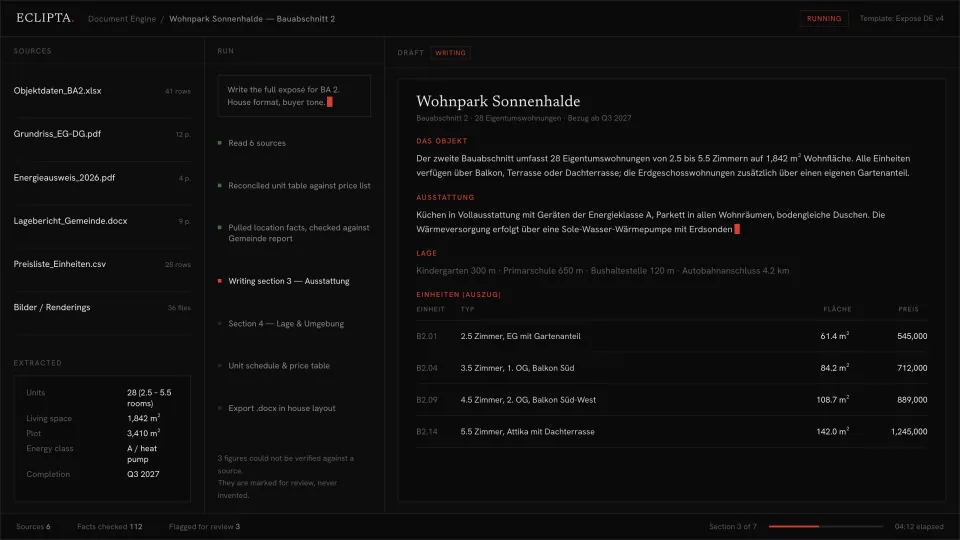
The built system does not sit in a chat window waiting for input. It is pointed at the project folder and produces the finished document. Roughly, it runs like this.
- 01
It reads the sources where they already live
Unit schedule, floor plans, energy certificate, municipal location report, price list, image folder. No export step, no re-typing. The files stay where your team already puts them.
- 02
It reconciles the numbers before it writes
Unit count, living space, plot size, areas per unit, prices. Where two sources disagree, the conflict is surfaced, not averaged away. This step is the reason the output can be trusted at all.
- 03
It writes into your house structure
Your section order, your tone, your table layouts, your legal boilerplate. The template is yours, learned from the exposés you have already published, not a generic brochure format.
- 04
It stops where it is unsure
A figure that cannot be traced to a source is marked for review rather than filled in. In a live run you can see the count: sources read, facts checked, items flagged. Three flagged figures is a normal, healthy result, not a failure.
- 05
It exports and files the result
The document comes out in your layout, in the format your team actually sends, and lands in the project folder. A person reads it, resolves the flags, and releases it.
Take this with you
A free prompt: raw property data to full exposé draft
This is the smallest useful piece of the above, and it works today in any capable chat assistant. You paste in whatever raw material you have, however messy: a unit table, viewing notes, a rent roll, an email from the architect. It returns a complete exposé outline with drafted text for every section. Its most important rule is the one it shares with the built system: it does not invent. Anything missing comes back as an explicit gap you have to close yourself.
You are an experienced real estate copywriter who writes property
exposés for a developer selling directly to buyers.

I will paste raw, unstructured project material below: a unit schedule,
area figures, viewing notes, a rent roll, an energy certificate summary,
or fragments of emails. It will be incomplete.

YOUR TASK
Produce a complete exposé draft with these sections, in this order:
  1. Headline and one-line summary
  2. The property (type, units, areas, completion or year built)
  3. Layout and construction
  4. Fittings and technical equipment
  5. Location and surroundings
  6. Unit schedule table (unit, type, area, price or rent)
  7. Energy and running costs
  8. Commercial summary (price, price per sqm, yield if calculable)
  9. Legal and disclaimer notes

ABSOLUTE RULE
Use only facts present in the material I paste. Never infer, estimate,
round, or fill a gap with a plausible value. Where a section needs a
fact I did not give you, write it exactly like this in the text:
  [MISSING: construction year]
  [MISSING: energy class, source: energy certificate]
Never write a sentence around a missing fact to hide it. A section that
is mostly [MISSING] markers is the correct output for thin material.
If two figures in my material contradict each other, do not choose.
Write [CONFLICT: living space 1,842 sqm vs 1,798 sqm] and continue.

STYLE
German market conventions for measurements and rooms if the material is
German. Factual, concrete, short sentences. No superlatives, no "dream
home", no "unique opportunity". Describe what exists. Never claim value,
appreciation or return unless it is arithmetic on numbers I gave you.

AFTER THE DRAFT, end with two lists:
  A. GAPS TO CLOSE: every [MISSING] item, with the document that would
     normally contain it.
  B. FACTS TO VERIFY: every figure you used that appeared only once and
     could not be cross-checked against a second mention.

RAW MATERIAL:
[PASTE EVERYTHING YOU HAVE HERE. MESSY IS FINE.]- Paste the prompt into a chat assistant, then paste your raw material where marked. Do not clean it up first, the mess is the point.
- Read list A at the end before you read the draft. It tells you which files still need to be opened.
- Fill the gaps, paste the material again, and let it rewrite. Two passes is usually enough.
- Move the finished text into your own template and do the layout by hand.
- Keep the prompt and adjust the nine sections to match your own exposé structure. That version will serve you better than this one.
It writes well, but it cannot fetch. A person still has to open the spreadsheet, the plan set and the certificate, and paste the contents in. It does not know your house format, so the layout work stays manual. It has never seen a previous project of yours, so your standard fittings text and your standard disclaimers get rewritten from scratch every time. And it forgets everything the moment you close the tab. The prompt turns pasted facts into a document. The built system finds the facts, checks them against each other, writes in your format and files the result.
Where the prompt ends and the system begins
The gap is not writing quality. A good prompt and a good system produce similar prose. The gap is everything around the writing: gathering, reconciling, formatting, filing, and remembering.
It is also the gap between a document you can read and a document you can defend. When a buyer asks where a figure comes from, the system can point at the row in the file it came from. A chat window cannot.
The principle behind that is deliberate and it applies to every system we build. Whatever is unambiguous runs on its own. Whatever is ambiguous waits for a person. Anything that touches money or a commitment goes to a person by default. The system does not guess, and it is not designed to make itself look confident.
- Reads your spreadsheets, plans and PDFs directly, with no copy-paste step.
- Cross-checks every figure against a second source and flags what it cannot verify.
- Writes in your section order, your tone and your table layouts.
- Knows your earlier projects, so standard text and disclaimers stay consistent.
- Exports in your house format and files the document where your team works.
- Every number stays traceable to the file and row it came from.
Frequently asked questions
Can AI write a property exposé that is actually usable?
For the prose, yes. Section text, fittings descriptions and location summaries come out at a publishable standard. The risk is not the language, it is the facts. A model asked to describe a property with incomplete data will produce confident sentences around the gaps. That is why the prompt above forces missing values into visible markers, and why the built system flags unverified figures instead of writing past them.
Can I not just do this with ChatGPT?
For a single document, yes, and the prompt on this page is exactly that. What a chat window cannot do is open your unit schedule, compare it against your price list, notice that two area figures disagree, write in your house template and file the result. Every one of those steps stays with a person. That is fine for one exposé a quarter and expensive when it is one a week.
How long does it take to set up a document engine for our exposés?
It depends almost entirely on how consistent your existing documents are. If you have a handful of published exposés and a stable folder structure, the first working draft comes quickly, because the template is learned from what you already produce. Messy or highly varied source data takes longer, and that work has value on its own. We scope it before anything is built, and you see the real answer before you commit.
What does it cost to automate exposé writing?
There is no list price, because there is no product being resold. What we build is scoped to your documents, your data and your format. The honest way to judge it is against the hours currently spent gathering figures and rebuilding layouts for every project, and against the cost of one wrong number reaching a buyer. We start with a scope conversation, not a quote.
Where does our property data go, and who can see it?
Your data stays yours. The system runs against your own storage and your own accounts, and we do not retain your project files. For teams with strict requirements, it can be set up so that no document content leaves infrastructure you control. Unit prices, buyer information and unpublished project data are precisely the material that should never end up in a general chat tool, which is a further reason not to work through one.
What happens when the source data is wrong or contradicts itself?
Nothing gets averaged, chosen or smoothed over. If the unit schedule says 1,842 square metres and the plan set implies something else, both figures are surfaced and the item is marked for review. A run that flags three conflicts has done its job. Contradictions in the source material are found earlier this way than they usually are, which is often the first thing teams notice.
Does it work for rental listings and commercial properties, not just new builds?
The pattern is the same wherever a document is assembled from structured data plus context: rental exposés, commercial letting documents, investment memoranda, project documentation for lenders. The sources differ, the reconciliation and formatting logic does not. The prompt on this page already handles rent rolls alongside sale prices.
Bring us one exposé
The fastest way to see whether this fits is a real project. Bring the folder for one development, the messy version, and the exposé you produced from it by hand. We will tell you honestly what a system could take over, what would still need a person, and what it would take to build. If the answer is that a prompt is enough for you, we will say that too.
Apply