
Sales teams
Automated cold outreach that sends, follows up and handles the replies
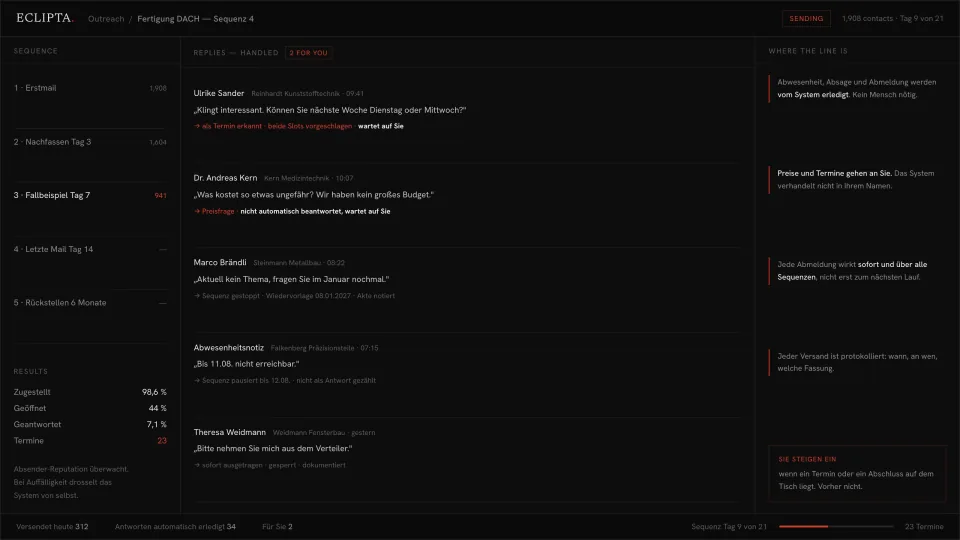
A sequence goes out on schedule. Follow ups stop the moment the right person answers. Replies get read, sorted and acted on: out of office pauses the thread, a later date becomes a diary entry, an unsubscribe takes effect immediately across every sequence you run. You step in when a meeting or a price is on the table, and not before.
Why outreach dies in the reply inbox, not in the sending
Sending is the easy half. Any tool can push a thousand emails on a schedule. The part that breaks is what comes back: a few hundred replies a week, most of them not answers at all, arriving in one inbox that someone has to work through by hand every morning before they can do anything else.
So the sequence keeps running when it should have stopped. A prospect answers on Tuesday and gets follow up three on Wednesday, because the reply landed in a shared mailbox nobody had opened yet. Someone says please take me off the list and stays on a second sequence that a colleague set up. Someone says ask me again in January and January passes.
Meetings are lost that way, and something slower is lost with them. The people most likely to buy are the ones who answered, and they are the ones who get the sloppiest treatment. Meanwhile nobody can say with certainty what was sent to whom, in which version, on which day, which is exactly the thing you need to be able to say when someone asks.
- A prospect replies and still gets the next follow up, because the sequence never learned they answered.
- Out of office notes are counted as replies, so your reply rate is fiction and threads stall for two weeks.
- Someone asks to be removed, and it is honoured in one list but not the other two.
- Later means never: no date is set, no reminder exists, the thread just ends.
- The reply that mattered, a real meeting request, sat unread for a day and a half.
- Nobody can reconstruct what a given contact actually received, and when.
How an outreach system runs a sequence and triages the answers
The system does the mechanical work end to end: it sends, it watches the mailbox, it classifies what comes back and it acts on the unambiguous cases by itself. Everything that involves a price, a promise or a commitment is handed to you with the context already assembled.
- 01
Build the sequence from your own material
Your steps, your intervals, your wording. A first mail, follow ups at the spacing you choose, a final message, then a defined end: either the contact is parked for a fixed period or the record is closed. Every step is written by you or with you, and versioned, so you know which wording a given contact received.
- 02
Send from your own systems, with the reason on the record
The sequence runs on your infrastructure, from your addresses, next to your own contact records. Every contact that enters a sequence carries why they entered it: which criteria put them there, where their details came from, and on what basis they are being approached. That means a single send can be explained on its own, months later, without reconstructing anything from memory.
- 03
Stop the sequence the moment the right person answers
A reply from the contact stops their thread immediately. An automatic out of office does not: it pauses the thread until the stated return date, and it is not counted as a reply in your numbers. A reply from a colleague saying you want a different person redirects the thread to that person instead of continuing to the wrong one.
- 04
Sort every reply into a category with the details pulled out
Meeting interest, price question, later, out of office, unsubscribe, wrong person. The system reads what was written, extracts the concrete parts, the dates offered, the period named, the person referred to, and attaches them to the record. The reply is filed in the account history, not left in a mailbox.
- 05
Act on the clear cases without asking you
Out of office pauses and resumes. Later becomes a dated follow up task on the day the person named. Unsubscribe is executed at once and across every sequence, then logged. Wrong person reroutes. These are the cases where the correct action is obvious, and doing them by hand is pure cost.
- 06
Hand you the cases that involve money or commitment
A meeting request comes to you with the proposed slots already read out of the mail. A price question comes to you untouched. The system does not name a price, does not negotiate, and does not confirm a meeting in your name. That is a rule, not a setting, because a machine that improvises about money costs more than it saves.
- 07
Log every send so the record can be produced
Who was contacted, when, with which version, from which address, on what basis, and what came back. Unsubscribes and suppressions are stored with a timestamp. When someone asks what you sent them, you answer from a record instead of from memory.
Take this with you
A prompt that sorts your cold outreach replies and tells you what to do next
This is the triage step of the system, in a form you can run today on whatever came in this morning. You paste a batch of replies. It sorts each one into a category, pulls out the useful specifics, dates offered, periods named, people referred to, and proposes the next action. It refuses to draft answers to prices and meetings, which is the same rule the built system follows.
You are triaging replies to a cold outreach email sequence. Work only from
the text I paste. Do not invent names, dates, budgets or intent.

MY OUTREACH
[ONE OR TWO SENTENCES: what the sequence offers, who it goes to, and what a
good outcome is, for example a 20 minute call.]

REPLIES
[PASTE THE REPLIES. One per block, in this shape:
---
FROM: [name, company]
RECEIVED: [date]
TEXT: [the reply, in the original language]
---
Repeat for as many as you have.]

For every reply, output exactly these lines:

CONTACT     name, company
CATEGORY    one of: MEETING INTEREST | PRICE QUESTION | LATER |
            OUT OF OFFICE | UNSUBSCRIBE | WRONG PERSON | UNCLEAR
CONFIDENCE  high or low. Use low whenever the wording could support two
            categories, and say which two.
DETAILS     only facts present in the text: dates or slots offered, the
            period named for a later contact, the return date of an
            absence, the name or role of the correct contact. Write "none
            stated" if the reply contains none.
NEXT STEP   the single next action, in one line.
FOR A HUMAN yes or no.

Apply these rules without exception:

1. UNSUBSCRIBE, or any wording that clearly asks to stop being contacted,
   is final. Next step is: remove from all sequences and suppress. Never
   propose a reply, a last question or a win back.
2. PRICE QUESTION is always FOR A HUMAN yes. Do not name, estimate or
   bracket a price, and do not draft the answer.
3. MEETING INTEREST is always FOR A HUMAN yes. List the slots the person
   offered. Do not confirm, propose or commit to any time.
4. OUT OF OFFICE is not a reply. Next step is: pause until the stated
   return date, do not count as a response.
5. LATER needs a date. If the person named a month or a period, convert it
   to a concrete follow up date and show your reasoning in one clause. If
   no period was named, say so and mark it UNCLEAR.
6. WRONG PERSON: name the person or role they pointed to, if any. If they
   pointed to nobody, say so.
7. If a reply is hostile, mentions data protection, or threatens legal
   steps, category UNCLEAR, FOR A HUMAN yes, no drafted response.

Then print two short lists: FOR YOU TODAY with the contacts needing a human
in priority order, and HANDLED with everything else in one line each.

No summary paragraph. No sales advice I did not ask for.- Copy the replies from this morning into the REPLIES block, in the language they were written in. Ten to fifty is a good batch.
- Fill in the one line about what your sequence offers. Without it, the categories drift.
- Run it, then read the FOR YOU TODAY list first and act on it before anything else.
- Execute the unsubscribes yourself, in every list you run, on the same day.
- Check the low confidence rows by hand. Those are the ones where the wording was genuinely ambiguous, and they are where you learn how your market actually answers.
It sorts what you paste, and only that. It does not know your mailbox, so nothing reaches it unless a person copies it in. It cannot stop a follow up going out tomorrow to someone who answered today, because it has no connection to your sending. An unsubscribe it identifies is still a note on a screen until you remove the person from every list yourself, and it has no memory of last week, so the same contact can be triaged twice with no sense that you have met before. It produces good judgements. It does not produce consequences.
From sorting a pasted batch to a sequence that governs itself
The prompt reads replies. The built system sits on the mailbox that receives them, and every judgement it makes turns into an action on its own. That is the entire distance between the two, and it is where the work actually goes.
In the built version, an answer from the contact stops their sequence in the same minute it arrives. An out of office pauses the thread to the stated return date and resumes it afterwards. Ask me in January becomes a dated task that appears in January. An unsubscribe is executed across every sequence in the account, immediately, and recorded with a timestamp. The reply itself is filed on the contact record, so the next person to touch that account sees the history rather than guessing at it.
What the system will not do is fixed. It does not quote prices. It does not confirm meetings in your name. It does not argue with someone who wants to be left alone. Those cases arrive on your desk with the relevant lines already extracted, which usually turns a ten minute reconstruction into a thirty second decision. Everything mechanical is handled, everything consequential is yours.
- The sequence stops on a real reply and pauses on an automatic one, so nobody gets followed up after answering.
- Later becomes a dated follow up instead of a good intention.
- Unsubscribes take effect at once, across every sequence, and are logged with a timestamp.
- Prices and meeting confirmations always go to a person. That rule is not configurable.
- Every contact carries why they entered the sequence and on what basis, so one send can be explained without reconstructing the whole campaign.
- Every send is on the record: recipient, time, version, and the reply that came back.
- Runs on your infrastructure and your own mailboxes, next to your CRM rather than inside a vendor's platform.
Frequently asked questions
Is automated cold email outreach legal in Germany and the EU?
It is regulated, not forbidden, and the rules are stricter than most tools admit. In the EU the GDPR governs how you may hold and use contact data, and in Germany the UWG governs unsolicited commercial contact, with narrow conditions for approaching businesses. You need a lawful basis for the data, a clear sender identity, and an unsubscribe that works immediately. We build the system to make that provable and we log every send, but the decision about who you may contact is yours and belongs with your legal advice, not with us.
What happens when someone asks to be removed from the list?
They are removed at once, from every sequence in the system, not only the one that reached them. The suppression is permanent and is applied before any future send, so a later campaign cannot pick them up again. The request and the moment it took effect are logged. There is no follow up message, no confirmation mail asking whether they are sure, and no win back attempt.
Will the system reply to prospects on its own?
Only in cases with no judgement in them, and only if you switch them on: pausing for an absence, rerouting to the correct contact. Prices, meeting confirmations, negotiations and anything hostile go to a person, always. The system prepares the answer material, the proposed slots, the history, the previous messages, but it does not make commitments in your name.
Can I not just do this with ChatGPT and a mail merge tool?
For one batch of replies, yes, and the prompt on this page is that. What a chat window cannot do is act. It cannot stop tomorrow's follow up to the person who answered today, it cannot honour an unsubscribe in the second list your colleague runs, and it forgets the contact the moment you close the tab. Nothing happens unless someone remembers to open it and paste. The built system is on the mailbox, and its judgements have consequences without a person in between.
What is the difference between this and a sales engagement platform?
A platform gives you sequences inside someone else's product, priced per seat, with your contacts, your replies and your history held in a system you cannot inspect. A built system runs on your infrastructure, next to your own records, and the rules that matter are fixed in the build rather than left to a settings page: what it settles by itself, what always reaches a person, what is written to the log. If a platform set up properly does the job, we will tell you so. The reason to build is that the judgement and the record stay yours.
Where does the contact data live and who can see it?
On your infrastructure: your server or your cloud account, your database, your own mailboxes. The contact list, the replies and the log stay with you. If a language model is used for the reply sorting, you decide which model and what it may see, and it can be run in a way that keeps the content inside your environment. We do not hold your prospect data.
What does an outreach system like this cost to build and run?
It is a build cost once plus hosting and maintenance, rather than a per seat fee on a sending platform. We do not publish a number because the honest one depends on how many mailboxes, sequences and existing systems it has to sit against. Before anything is built we tell you which parts are worth automating and which are cheaper left manual, including the case where an off the shelf tool set up properly is the right answer.
Does it work with replies in more than one language?
Yes. Sorting happens on what was written, in the language it was written in, and the extracted details keep their original wording. Sequences can be run per language with the wording you supply. Where a reply is short or ambiguous enough that the category could go two ways, it is marked as uncertain and sent to a person rather than resolved by a guess.
Bring us a week of replies
If the prompt above told you that half your inbox is out of office notes and the meeting requests are the ones waiting longest, that gap is the project. Apply, bring a week of real replies and the sequence you send, and we will tell you honestly what should be automated and where a person has to stay in the loop.
Apply