
Every business
A custom CRM built around your sales process, not around someone else's template
Standard CRMs ask you to describe your business in their vocabulary. This one is built the other way round: your stages, your fields, your deal history, on your own server. No seats, no feature tiers, no upgrade to unlock the thing you needed on day one.
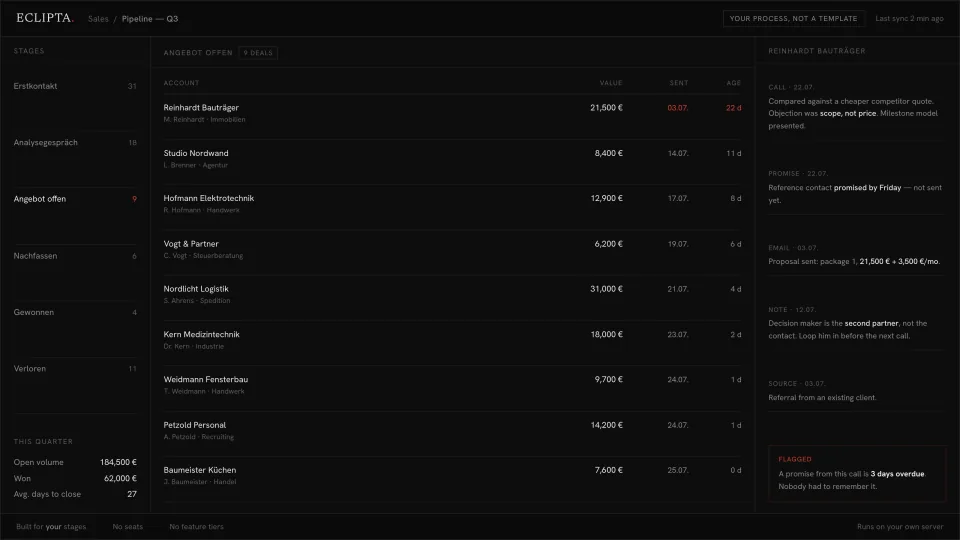
Why your team stopped using the CRM you already pay for
Almost every company we talk to has a CRM. Almost none of them trust it. The reason is rarely the software being bad. It is that the software was designed for a generic sales motion, and yours is not generic. So somebody mapped your process onto theirs, badly, at setup. Everything after that is friction.
The symptom is always the same. The real pipeline lives in someone's head, in a spreadsheet, and in a WhatsApp thread. The CRM holds a stale copy of it. Reporting comes out of the CRM, so reporting is wrong. Nobody says this out loud, they just stop looking at the dashboard.
Then the pricing works against you. You pay per user, so you keep people out of the system who should be in it. You pay per tier, so the field you actually need sits behind a plan upgrade. Over a few years you have spent more on rent than a system built for you would have cost, and you still do not own it.
- Your stages are named after a template, so people translate in their heads before every update.
- Half the required fields are ignored, and the two that decide deals were never fields at all.
- The forecast is assembled by hand at the end of the quarter, because nobody believes the pipeline view.
- A promise made on a call is remembered by one person, and only until they get busy.
- New hires learn the real process by watching, not from the system.
- Adding a seat, a field or a report means a sales call with a vendor.
How a CRM gets built around your process instead of the reverse
The build starts from your deals, not from a data model. We look at what actually happened in a set of real closes and real losses, name the stages that are already there, and only then write software. The result is small, because a system that fits does not need many features.
- 01
Read the deals first
We go through recent wins and losses with the people who ran them. Not a workshop about ideal process, a reconstruction of what happened. That is where the true stages appear, including the ones nobody had a name for, like the wait for a second signatory.
- 02
Name the stages your team already uses
Stages get the words your salespeople say out loud, in your language. Each one has a clear entry event and a clear exit event, so a deal is never in two places and never parked in a stage nobody owns.
- 03
Keep the fields that change outcomes
Every field has to earn its place by having decided something in a real deal. What is left is short enough that people fill it in. Bureaucracy fields are cut, and the two or three decisive things that were never recorded finally get a home.
- 04
Let the system do the remembering
Calls, emails and notes land on the account by themselves. Promises made in a conversation become tracked items with a date. When one goes overdue, the system says so. Nobody has to remember it, which is the point, because remembering is the part humans reliably fail at.
- 05
Connect it to the rest of the company
The CRM is not an island. Offers, invoices, delivery status, support history and inbound leads can feed the same record, so an account page shows the whole relationship rather than the sales half of it.
- 06
Stop where a human is needed
The system moves a deal when the evidence is unambiguous, for example a signed document arriving. Where it is ambiguous, it flags instead of guessing: it will tell you a deal has gone quiet, it will not decide the deal is lost. Anything touching money, discounts or commitments goes to a person on principle.
- 07
Run it on your infrastructure
Your server or your cloud account, your database, your backups. No per seat pricing, so everyone who should see the pipeline can see it. You keep the data and the code, so the system can change when your process changes.
Take this with you
A prompt that derives your real pipeline stages from ten deals
This is the first step of the build, in a form you can run yourself today. You describe ten deals you actually ran, five that closed and five that did not. The prompt works out the stages that genuinely exist in your business, what a deal is really waiting on at each one, and which fields are worth recording. It is useful whether or not you ever build anything: it tells you what your process is.
You are a sales operations analyst. I will describe ten real deals from my
company: five we won, five we lost or that went quiet. Work only from what I
write below. Do not invent stages, reasons or numbers.

MY DEALS
[PASTE TEN SHORT DESCRIPTIONS. For each: how the contact started, what
happened in what order, who decided, what was sent, what the sticking point
was, how it ended. Two to six sentences each. Anonymise names if you like.]

WHAT I SELL
[ONE OR TWO SENTENCES: the offer, the typical deal size, the typical time
from first contact to decision.]

Do four things, in this order.

1. STAGES
Derive the pipeline stages that actually occur in these ten deals, in order.
Name them with words taken from my own descriptions, not with generic CRM
labels. For each stage give me: the event that moves a deal into it, the
event that moves it out, and how many of the ten deals passed through it.
If a stage appears in only one deal, say whether it is a real stage or a
one off.

2. WHERE DEALS STICK
For each stage, name what a deal is really waiting on there: a person, a
document, a decision, a price, a season. Then say which stage lost the most
deals in this sample and what the losses have in common. If two losses are
too different to generalise, say that instead of forcing a pattern.

3. FIELD SCHEMA
Propose the fields worth recording, in three lists.
  KEEP     fields that visibly changed an outcome in at least one deal
  DROP     fields companies usually track that never mattered here, each
           with one line on why it would be bureaucracy for my business
  MISSING  information that was clearly decisive but that nobody wrote down
For each KEEP field give: name, type (text, date, money, person, or choice
with the options you actually saw), and the single question it answers.

4. OPEN QUESTIONS
List up to five things you had to guess at. Ask them as plain questions, and
mark every point in sections 1 to 3 that rests on one of those guesses.

Output plain headed lists. No summary paragraph, no advice I did not ask for.- Pick ten deals from the last twelve months: five won, five lost or gone quiet. Mix deal sizes.
- Write each one up from memory and from the email thread. Rough notes are fine, order matters more than polish.
- Paste them into the prompt, run it, then read section 4 first. The guesses tell you what your records do not capture.
- Correct the stage names into the words your team really uses, and run it again.
- Take the KEEP list to your existing CRM and see how much of it you can even store.
This gives you a document. A good one, and most teams have never had it. But it is a snapshot of ten deals you typed out by hand, and it stays a snapshot. It does not watch the eleventh deal. It does not know the account that has gone quiet since Tuesday, it does not file the call you had this morning, and it has never seen your invoices, your inbox or your delivery status. It proposes a schema, it does not become one.
From a document about your process to a system that runs it
The prompt tells you what your pipeline is. The built system is that pipeline, running, with the company's actual data flowing through it. That is the whole difference, and it is a large one.
In the built version the stages exist as software, the fields are the ones the analysis kept, and the record fills itself from the places work already happens. A proposal goes out and the account knows. A call ends and the notes are on the account, with the promise made in it tracked to a date. When that date passes with nothing sent, the deal is flagged, without anyone having set a reminder.
It stays honest about its limits, which is why people trust it. Unambiguous events move deals automatically. Ambiguous ones are surfaced for a human, not decided by the system. Anything involving money, a discount or a commitment to a client goes to a person by default, no exceptions, because a system that guesses about money is worse than no system at all.
- Your stages and your vocabulary, not a template you translate in your head.
- The record fills itself from email, calls and documents, so pipeline reporting is a byproduct rather than a monthly chore.
- Promises and follow ups are tracked with dates, and going overdue is a system event, not a personal failing.
- One account page covering sales, delivery, invoices and support, because they are the same relationship.
- Runs on your own infrastructure. No seats, no feature tiers, no per user maths before adding a colleague.
- You own the code and the data, so the system changes when your process changes.
Frequently asked questions
Why build a custom CRM instead of using Salesforce or HubSpot?
Because the cost of a standard CRM is not mainly the licence, it is the process distortion. You bend how you sell to fit the tool, and then spend years paying for the mismatch in bad data and ignored fields. A built system is smaller, uses your own stage names, and holds only fields that decide something. If your sales motion is genuinely standard, an off the shelf CRM is the right answer and we will say so.
Can I not just do this with ChatGPT?
For the analysis, yes, and the prompt on this page is exactly that. What a chat window cannot do is be there on the eleventh deal. It has no memory of your accounts, no connection to your inbox or your documents, and nothing happens unless a person opens a tab and pastes something in. The built system watches the pipeline continuously and files what arrives. That is a different category of thing, not a better prompt.
How long does it take to build a CRM around our sales process?
The analysis takes days, not weeks, because it works from deals you already ran. A first usable version with your stages, your fields and your existing data imported is typically a matter of weeks, and you use it while the rest is added. We build the part that hurts most first, so the system earns its keep before it is finished.
What does a custom CRM cost compared to a subscription?
It is a build cost once, plus hosting and maintenance, instead of a per user fee that grows every time you hire. We do not publish a number because the honest one depends on how many systems it has to connect to. What we will tell you before the build is where the line sits between what is worth automating and what is cheaper left manual.
Where does our customer data live, and who can see it?
On your infrastructure: your server or your cloud account, your database, your backups. We do not hold your pipeline, and it does not sit in a vendor's multi tenant system. Access is defined by you, per person and per record. If a language model is used anywhere in the system, you decide which model and what it is allowed to see.
Will the system move deals or contact customers on its own?
It moves a deal only when the event is unambiguous, for example a signed contract arriving or a proposal being sent. Everything else it flags for a human: a stalled account, an overdue promise, a contact who is not the actual decision maker. Anything that touches money or makes a commitment to a client goes to a person by default. The system is built to stop rather than guess.
Can we migrate the data out of our current CRM?
Yes, and it is a normal part of the build. Accounts, contacts, open deals and history come across, mapped onto the stages the analysis produced rather than the old ones. Records that cannot be mapped cleanly are listed for you to decide on instead of being silently reshaped, which is where most migrations quietly lose their meaning.
Bring us ten deals
If the prompt above told you something about your own pipeline that your CRM does not know, that gap is the project. Apply, bring five wins and five losses, and we will tell you honestly whether this should be built or whether a standard tool set up properly would do.
Apply