
Agencies
Agency client onboarding automation, from signed offer to first working day
New clients onboarded by the system. Intake, kickoff documents and setup run on their own, out of the offer the client already signed. Your team starts delivering on day one, not in week three.
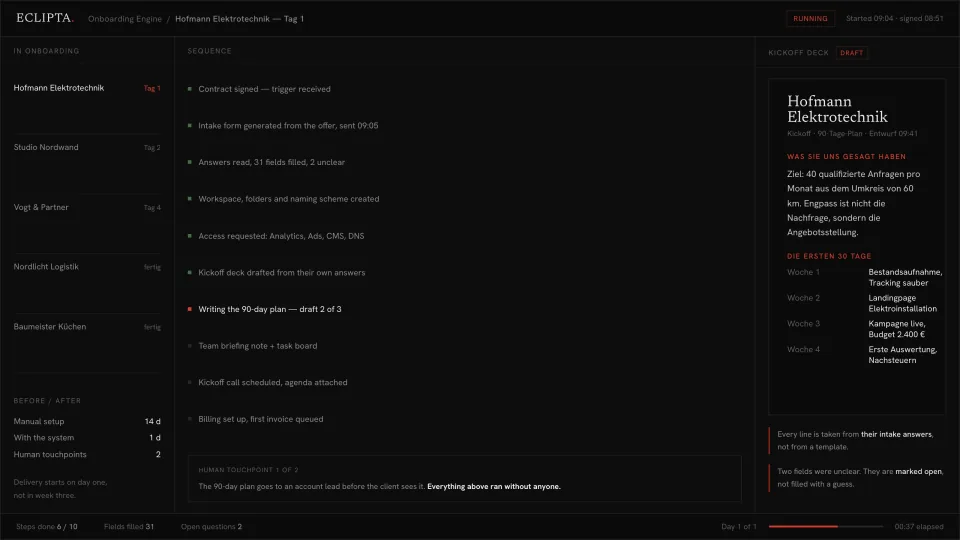
Why agency onboarding takes three weeks instead of one day
The contract is signed on a Tuesday. The work starts somewhere in the following month. In between sits a stretch of unpaid, unbilled, invisible labour that nobody in the agency wants to own.
None of it is hard. It is a long chain of small handovers: someone writes the intake questions, someone chases the answers, someone asks for the analytics and ad account, someone builds the folders, someone turns the answers into a kickoff deck. Every link waits on a person who has billable work of their own, so the chain only moves when somebody remembers it.
The cost is not only time. It is the first impression. A client who signed with energy spends three weeks answering questions and seeing nothing back. By the time the kickoff call happens, the momentum that closed the deal is gone.
- The intake questionnaire is the last project's questionnaire with the client name changed, so it asks for things this engagement will never need.
- Access to analytics, ads, CMS and DNS is requested in four separate emails over two weeks, each one waiting on the previous reply.
- The kickoff deck is a template with the client's logo dropped in, and the strategist rewrites it anyway.
- Answers arrive in an email thread and then have to be typed again into the plan, the brief and the project tool.
- Nobody can say where a given onboarding stands without opening five tools and asking two people.
- The account lead's first real thought about the account happens in week three, because until then they were doing setup.
How the onboarding system works, step by step
The signed offer is the trigger and the source. Everything the system builds comes out of what the client actually bought and what they answered, not out of a template. It runs the whole first day and stops in exactly two places where a human belongs.
- 01
The signature starts it
The moment the contract or offer is signed, the sequence begins. No one has to notice, forward anything or open a ticket. The system reads the scope that was agreed, the deliverables, the term and the commercials, and works out what this particular engagement needs before anyone talks to the client.
- 02
The intake form is written for this client
Instead of a standing questionnaire, the system generates the questions this scope requires and leaves out the rest. A local SEO retainer and a brand relaunch get different forms. Each question carries the reason it is being asked, which is why clients answer them properly instead of skipping half.
- 03
Answers are read, not just collected
The returned answers are parsed into the fields the rest of the onboarding needs. Clear answers are filled in. Answers that are ambiguous, contradictory or missing are marked open. The system does not invent a target audience because the field was blank.
- 04
Workspace, folders and access are set up
The project workspace, the folder structure and the naming scheme are created the way your agency already does it. Access requests for analytics, ad accounts, CMS and DNS go out together, in one pass, with the exact permission level each one needs.
- 05
Kickoff deck and 90 day plan are drafted from their own words
The kickoff document quotes the client back to themselves: their goal, their bottleneck, their constraint, in the language they used. The first 30, 60 and 90 days are laid out against the scope that was signed. Open questions stay visible on the page rather than being filled with a plausible guess.
- 06
The team gets a briefing, the client gets a call
A briefing note and a populated task board go to the delivery team. The kickoff call is scheduled with the agenda attached. Billing is set up and the first invoice is queued for release.
- 07
Two human touchpoints, and only two
The 90 day plan goes to an account lead before the client ever sees it, and anything that touches money or a promise goes to a person by default. Everything before that ran without anyone. That is the whole design: what is unambiguous runs, what is ambiguous waits.
Take this with you
Free prompt: build a kickoff questionnaire from a signed offer
This is the first link of the chain, and the one most agencies get wrong. Paste in the signed offer and you get a kickoff questionnaire built for that engagement: only the questions this job needs, grouped so the client can answer in one sitting, each question carrying the reason it is asked. Works in any capable chat assistant.
You are an operations lead at a [AGENCY TYPE, e.g. performance marketing / branding / web] agency.
Below is the signed offer for a new client. Build the kickoff questionnaire for this
engagement only.

RULES
1. Ask only what this scope actually requires. If the offer does not include paid
   media, do not ask about ad budgets. Cut every question a generic template would
   include out of habit.
2. Every question gets one short line: why we ask, and what we do with the answer.
   Clients answer properly when they can see the point.
3. Group the questions under these headings, in this order:
   ACCESS AND ACCOUNTS, DECISIONS AND APPROVALS, BRAND AND VOICE,
   GOALS AND CONSTRAINTS, PRACTICAL DETAILS.
   Drop any heading that has no questions.
4. Under ACCESS AND ACCOUNTS, name the specific systems this scope needs and the
   permission level required for each. Do not list systems the scope does not touch.
5. Under DECISIONS AND APPROVALS, establish who signs off what, how long they need,
   and who decides when they are unavailable.
6. Mark each question REQUIRED (work cannot start without it) or HELPFUL.
   Keep REQUIRED under [NUMBER, e.g. 12] items.
7. Write plainly. No jargon the client would have to look up.
8. If something in the offer is unclear or contradictory, do not guess and do not
   silently smooth it over. End the document with a section OPEN FOR US, listing
   what our own team has to clarify internally before this goes out.

OUTPUT
- A short intro paragraph to the client: what this form is for, roughly how long it
  takes, what happens after they send it back.
- The grouped questions, numbered, each with its one line reason.
- The OPEN FOR US section.

SIGNED OFFER / SCOPE OF WORK:
[PASTE THE FULL TEXT OF THE SIGNED OFFER OR STATEMENT OF WORK HERE]
- Paste the prompt, replace the bracketed placeholders, and paste the full signed offer at the bottom.
- Read the OPEN FOR US section first. It usually shows you what was left vague in your own sales conversation.
- Delete or rewrite anything that does not match how your agency actually works. The output is a first draft, not an instruction.
- Send it to the client, then keep the version you sent. After three or four clients you will see which questions you always add by hand, and those belong in the prompt.
This produces one document. That is all it produces. It does not send itself to the client, does not follow up when the answers do not arrive, and does not know that this client already answered half of it during the pitch. When the answers come back, someone still has to read them, create the workspace, request the accounts, and retype the same facts into the plan, the brief and the project tool. The prompt fixes the first link. The chain is still yours to pull.
Where the prompt stops and the built system starts
A good questionnaire saves an hour. The three weeks are not lost in writing the form, they are lost in everything that happens around it: the waiting, the chasing, the retyping, the four separate access emails, the deck that gets rebuilt from a template every time.
The built system takes the same starting point, the signed offer, and carries it to a working first day. It reads the answers instead of collecting them, sets up the workspace and access itself, and writes the kickoff deck and the 90 day plan out of the client's own words. Nothing is copied from one document into another by hand, because there is no hand in the middle.
It also knows what it does not know. Fields that came back unclear are marked open and named out loud. The plan goes to an account lead before the client sees it, and anything touching money or a commitment goes to a person by default. The system is fast because it never has to be second guessed, and it never has to be second guessed because it does not guess.
- Triggered by the signature itself, not by someone remembering to start onboarding.
- Intake questions generated per engagement from the signed scope, then read back into structured fields.
- Workspace, folder structure, naming scheme and access requests created in one pass, in your agency's own conventions.
- Kickoff deck, 90 day plan, team briefing and task board written from the client's answers, with open items left visibly open.
- Kickoff call scheduled with agenda, billing set up, first invoice queued.
- Two human touchpoints by design: the plan before it reaches the client, and anything involving money or a promise.
Frequently asked questions
How long does it take to automate client onboarding in an agency?
The build follows your existing onboarding, so the first step is writing down what actually happens today, including the parts that only live in one person's head. From there the system is built around your real sequence rather than a generic one. The honest answer on effort is that the mapping takes more of your time than the building does, and the mapping is worth doing even if you never automate it.
Can I not just do this with ChatGPT?
For one document, yes, and the prompt on this page is exactly that. What a chat window cannot do is trigger itself when a contract is signed, request access to four systems, create the workspace, and carry the same facts into the plan, the brief and the task board without anyone copying anything. The gap between the two is not the quality of the writing. It is that one of them needs a person sitting in front of it and the other does not.
What happens when a client gives an unclear or incomplete answer?
It is marked open and stays visible in the document. The system does not fill a blank field with a plausible guess, and it does not quietly pick the most common answer from previous clients. Ambiguity is escalated to a human, which is why the output can be trusted enough to send.
Who owns the client data, and where does it live?
Your systems. The onboarding runs on the tools you already use and the data stays in your workspace under your accounts. Client answers, contracts and access credentials are not handed to a third party platform that keeps a copy. Model choice, hosting and retention are decided in the build, not assumed.
Does this replace the account manager?
No. It removes the setup work that was standing between the account manager and the account. The two human touchpoints are deliberate: the 90 day plan is reviewed by an account lead before it reaches the client, and anything involving money or a commitment goes to a person. What changes is that the first real strategic thought about the client happens on day one instead of week three.
Will the kickoff documents look like every other agency's template?
They are written from the signed scope and the client's own intake answers, in your agency's structure and voice. That is the point of generating them rather than filling them in: a template says the same thing to every client, and clients can tell.
What does it cost to run once it is live?
Running costs come down to model usage and hosting, and onboarding is a low volume process, so they are small next to the unbilled hours removed. The larger number is the build, quoted against your actual sequence rather than per seat. If your onboarding is three steps long, we will tell you it is not worth building.
Onboard the next client on day one
If your onboarding runs on reminders, handovers and a template deck, it can run on the signed offer instead. Tell us what happens between signature and kickoff today, and we will tell you which parts of it should never have needed a person.
Apply